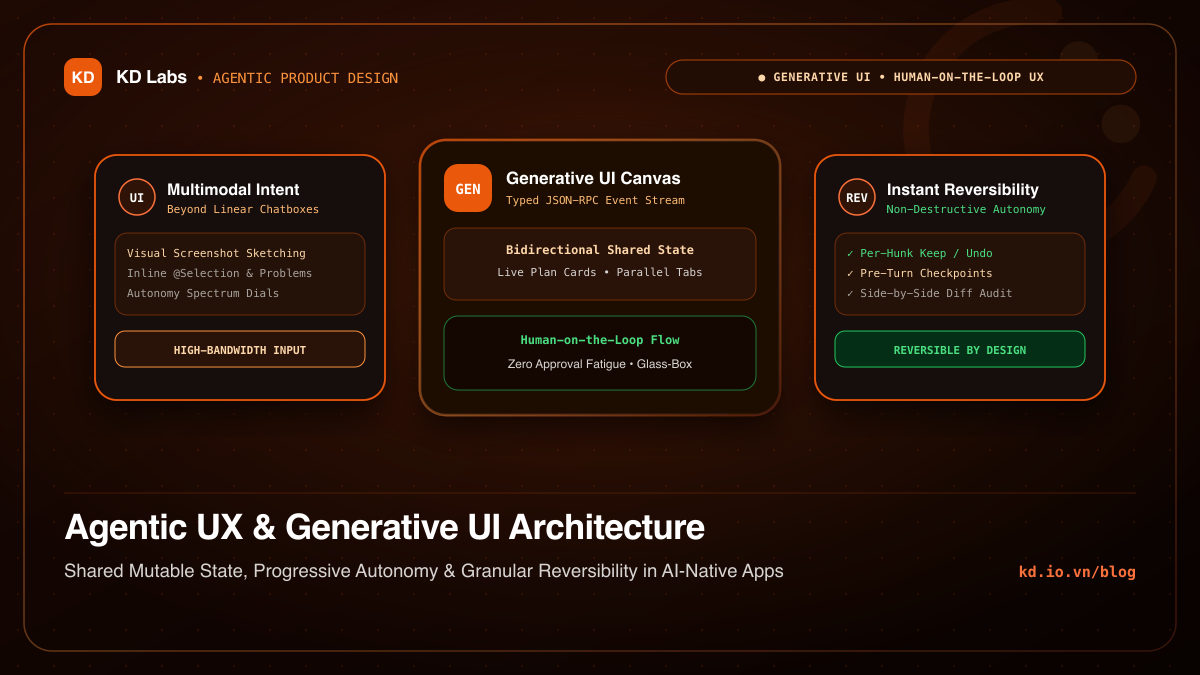
During the first wave of generative AI adoption, thousands of software teams took the path of least resistance: bolting a floating chatbot widget onto the bottom-right corner of an unchanged legacy interface. Real-world usage quickly exposed a hard truth: a linear text chatbox is a remarkably poor interface for high-precision professional workflows.
Natural language excels at expressing high-level intent, yet fails miserably at spatial manipulation, reviewing 200-line multi-file diffs, or supervising five asynchronous background workers simultaneously. Building genuinely AI-Native products demands rethinking human-computer interaction from first principles — a discipline emerging as Agentic UX.
1. “AI-Wrapped” Software vs. True “AI-Native” Architecture
The architectural divide between bolting AI onto existing CRUD screens (AI-Wrapped) and designing around autonomous collaboration (AI-Native) spans four core dimensions:
| Architectural Dimension | AI-Wrapped Legacy Software | True AI-Native Software (Agentic UX) |
|---|---|---|
| Primary Interaction Locus | User clicks static forms manually; chat sidebar lives in an isolated silo. | User declares intent; humans and agents co-inhabit a shared mutable workspace. |
| Output Representation | Walls of raw Markdown prose requiring manual copy-and-paste. | Generative UI: Interactive plan cards, inline hunk diffs, live telemetry widgets. |
| Execution Concurrency | Synchronous & blocking: user stares at a pulsing spinner waiting for text. | Asynchronous & multiplexed: dispatch background agents, review when ready. |
| Failure Recovery | Brittle all-or-nothing mutations that corrupt working state on error. | Reversible by Design: Per-hunk Keep/Undo controls and instant pre-turn Checkpoints. |
2. Structured Generative UI & Bidirectional Shared State
In an Agentic UX architecture, conversational prose serves merely as narrative glue while domain work renders through Structured Generative UI. Rather than streaming unstructured paragraphs, the orchestration layer streams strongly typed JSON-RPC events (such as ACP plan updates, tool call lifecycles, and unified diffs) hydrated into native interactive UI components:
┌───────────────────────────────────────────────────────────────────────────┐
│                   SHARED WORKSPACE STATE (Single Canvas)                  │
│        Humans and Agents Read & Mutate State via Atomic Patch Streams     │
└───────────────────┬───────────────────────────────────────┬───────────────┘
                    │ Direct Manipulation                   │ Typed Event Stream
                    ▼                                       ▼
      ┌───────────────────────────┐           ┌───────────────────────────┐
      │     HUMAN INTERACTION     │           │    AGENT EXECUTION LOOP   │
      │ • Draw Visual Annotations │           │ • Multi-Step Plan Updates │
      │ • Click Per-Hunk Keep/Undo│           │ • Tool & Subagent Spawns  │
      │ • Edit Code Inline Live   │           │ • Context Compaction Sync │
      └───────────────────────────┘           └───────────────────────────┘
Crucially, Bidirectional State Synchronization ensures that when a developer edits a function manually in the editor mid-conversation, the agent observes that exact workspace mutation on its next turn rather than blindly overwriting human edits with stale buffer snapshots.
3. Graduating from “Human-in-the-Loop” to “Human-on-the-Loop”
As agent trajectories stretch from three-second completions to fifteen-minute multi-file refactors, forcing synchronous approval on every trivial file read (rigid Human-in-the-Loop) triggers severe Approval Fatigue — conditioning users to reflexively click “Allow” without reading security prompts.
Modern Human-on-the-Loop UX replaces constant interruption with Progressive Autonomy Dials backed by Zero-Cost Reversibility:
- Frictionless Read-Only Exploration: Permit agents to search symbols, inspect diagnostics, and read workspace files autonomously without breaking the developer’s flow state.
- Optimistic Sandboxed Mutation: Let agents freely modify code and run test suites inside an isolated Git worktree paired with automatic pre-turn Checkpoints, making mistakes completely non-destructive.
- High-Signal Escalation Gates: Interrupt human attention strictly at irreversible trust boundaries — executing untrusted setup scripts, accessing external network endpoints, mutating system configurations, or opening Pull Requests.
4. Agentic UX Patterns Engineered into KD Code
At KD Labs, every interaction surface inside KD Code embodies these Agentic UX principles for daily systems engineering:
- Multimodal Visual Intent (Inline Image Annotation): Instead of typing two paragraphs explaining “the header badge misaligns on mobile viewports”, paste a screenshot directly into the composer and circle the exact defect with arrows and labels.
- Glass-Box Lifecycle Visibility: Inspect live execution plans, spawned subagents, terminal streams, and
ccusagetoken metrics through progressive disclosure panels that keep reasoning transparent without cluttering your workspace. - Multiplexed Parallelism (Best-of-N Group Tabs): Move beyond single-threaded chat by dispatching one prompt across multiple agents in parallel worktrees and inspecting their completed diffs side by side.
- Granular Per-Hunk
Keep / Undo: Accept eight clean hunks while reverting two unwanted edits directly inside the editor or diff view — or roll back the entire workspace to any historical Checkpoint in one click.
The future of AI-Native software is not turning every professional tool into a messaging app; it is crafting high-bandwidth symbiotic workspaces where human judgment steers architecture and autonomous agents shoulder the execution grind.