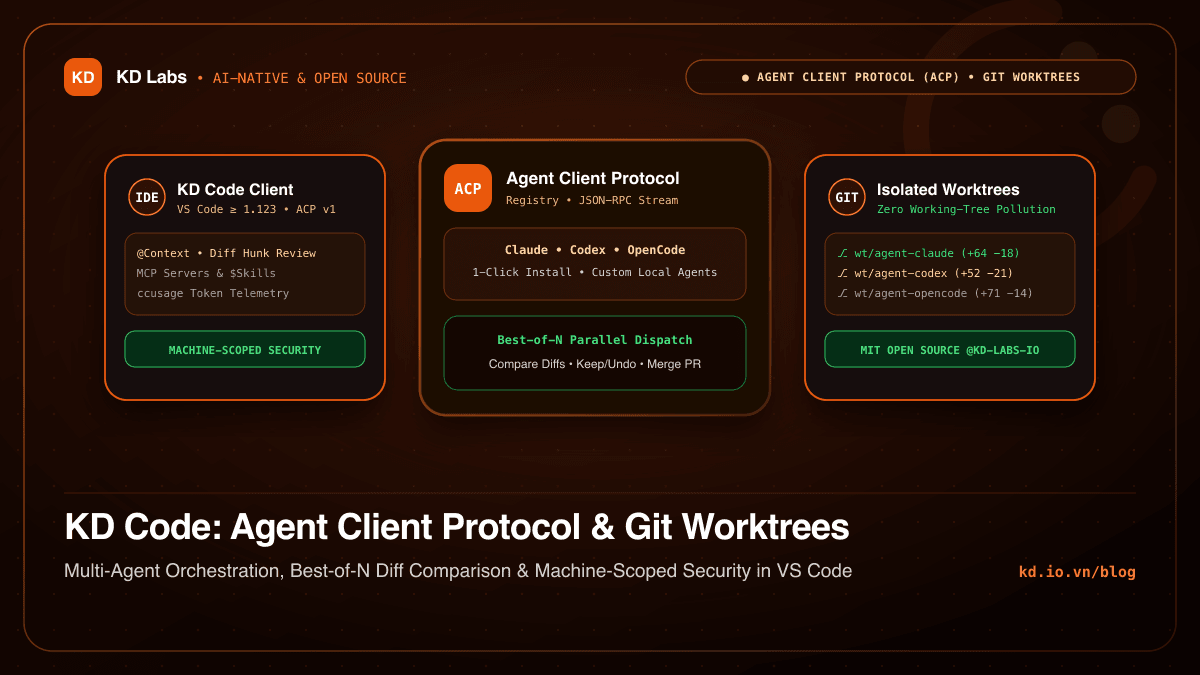
In the era of AI-Native software engineering, developers have moved far beyond single-line autocomplete. Autonomous Coding Agents — such as Claude Code, Codex, and OpenCode — can traverse entire repositories, execute test suites in terminals, formulate multi-step plans, and refactor dozens of files across a codebase.
Yet bringing autonomous agents into daily production workflows inside an IDE exposes three fundamental architectural bottlenecks:
- Protocol Fragmentation (Vendor Lock-in): Every coding agent invents its own CLI wrapper, permission prompt flow, and streaming event schema.
- Working-Tree Pollution: When an agent is mid-flight modifying 15 files in your current branch, you cannot simultaneously fix an urgent bug or test an alternative architectural approach without corrupting your Git index.
- Untrusted Workspace Execution Risks: Allowing repository-level configuration files (
.vscode/settings.json) to define custom agent binaries, MCP servers, or environment variables creates a severe Remote Code Execution (RCE) vector when opening third-party repositories.
To solve these challenges from first principles, KD Labs engineered and open-sourced KD Code (kd-labs-io/kd-code-extension) — a native VS Code extension powered by the open Agent Client Protocol (ACP) and isolated Git worktree orchestration.
1. Agent Client Protocol (ACP): Standardizing IDE-to-Agent Communication
Just as the Language Server Protocol (LSP) decoupled code editors from language compilers, the Agent Client Protocol (ACP) establishes a universal standard for editors to stream conversations, negotiate tool permissions, and synchronize file edits with any compliant coding agent.
┌─────────────────────────────────────────────────────────────────────────┐
│                    VS CODE (KD Code Extension Host)                     │
│  ┌──────────────────┐   ┌────────────────────┐   ┌───────────────────┐  │
│  │ Secondary Sidebar│   │ Diff & Hunk Engine │   │ Machine-Scoped    │  │
│  │ Multi-Tab UI     │   │ Keep / Undo / Sync │   │ Security Gate     │  │
│  └────────┬─────────┘   └─────────┬──────────┘   └─────────┬─────────┘  │
└───────────┼───────────────────────┼────────────────────────┼────────────┘
            │                       │                        │
            ▼                       ▼                        ▼
┌─────────────────────────────────────────────────────────────────────────┐
│                 AGENT CLIENT PROTOCOL (ACP) TRANSPORT                   │
│       JSON-RPC Stream • Tool Permissions • Subagent & Plan Events       │
└───────────────────┬───────────────────────────────┬─────────────────────┘
                    │                               │
        ┌───────────┴───────────┐       ┌───────────┴───────────┐
        ▼                       ▼       ▼                       ▼
┌───────────────┐       ┌───────────────┐               ┌───────────────┐
│  Claude Code  │       │  Codex Agent  │      ...      │   OpenCode    │
│ (ACP Adapter) │       │ (ACP Adapter) │               │ (ACP Adapter) │
└───────────────┘       └───────────────┘               └───────────────┘
In KD Code, the ACP client layer delivers:
- 1-Click ACP Registry Installation: Browse and install Claude, Codex, OpenCode, and other compliant agents directly from the official ACP Registry (
npxoruvxmanaged) with startup update checks and a built-in Setup Doctor. - Full Agent Lifecycle Visibility: Follow the agent’s live execution plans, tool invocations, spawned subagents, terminal streams, and context compaction directly inside the secondary sidebar.
- Protocol Tracing & Token Telemetry (
ccusage): Inspect per-turn token counts, context window saturation, latency, raw ACP JSON-RPC logs, and daily/session cost breakdowns via integratedccusageanalytics.
2. Isolated Git Worktrees & Parallel “Best-of-N” Comparison
The architectural centerpiece of KD Code is treating the Git Worktree as the primary isolation unit for agent execution.
When you enable worktree mode in the composer (or set it as the default for every new chat tab), KD Code automatically:
- Creates a dedicated branch named after your initial prompt.
- Spawns an isolated Git worktree linked to your repository without touching your active editor checkout.
- Copies essential git-ignored files (such as
.envandnode_modules) and runs your approved setup script.
“Best-of-N Compare”: Running Multiple Agents in Parallel
For complex refactors or subtle concurrency bugs, relying on a single model run is often suboptimal. KD Code’s Compare (Best-of-N) mode dispatches a single prompt across multiple agents, models, and effort levels simultaneously:
                     [ Single Engineering Prompt ]
                                  │
         ┌────────────────────────┼────────────────────────┐
         ▼                        ▼                        ▼
┌─────────────────┐      ┌─────────────────┐      ┌─────────────────┐
│ Worktree #1     │      │ Worktree #2     │      │ Worktree #3     │
│ Agent: Claude   │      │ Agent: Codex    │      │ Agent: OpenCode │
│ Branch: wt/a1   │      │ Branch: wt/a2   │      │ Branch: wt/a3   │
└────────┬────────┘      └────────┬────────┘      └────────┬────────┘
         │                        │                        │
         └────────────────────────┼────────────────────────┘
                                  ▼
             [ Group Tab: Side-by-Side Diff Inspection ]
         ──> Apply Winner, Merge Branch, or Draft PR via gh CLI
Each agent operates inside its own isolated worktree under a unified Group Tab. Once completed, you can compare their diffs side by side, apply the cleanest implementation, merge the branch, or let the winning agent draft and open a Pull Request via the GitHub CLI — then prune all temporary worktrees in one click.
3. Multimodal @Context & Granular Diff Review (Keep / Undo)
High-precision agent output requires high-signal context and effortless review:
- Instant
@ContextAttachments: Attach files, directories, IDE Problems (Cmd+Alt+P), active editor selections, or the last failed terminal command output (Cmd+Alt+L). - Built-in Image Annotation: Paste screenshots directly into the composer and annotate them with freehand pen, arrows, rectangles, and text labels before sending them to the agent.
- Per-Hunk Keep & Undo with Checkpoints: Review every change per file or per hunk right inside the chat and editor, or restore your workspace files to a pre-message Checkpoint at any time.
4. Machine-Scoped Security Boundaries
Security is a first-class engineering pillar at KD Labs. To protect developers when opening untrusted repositories:
- Strict Machine-Scoped Execution Settings: Every setting that determines what code executes on your machine — custom agent commands, MCP servers, environment variables, and Node/
ccusagebinary paths — is restricted exclusively to machine scope. A workspace.vscode/settings.jsoncannot override them. - Cryptographic/Content-Aware Setup Gates: Project worktree setup commands always prompt for confirmation before first execution, and re-prompt automatically whenever the command string or any script file it references changes.
- Registry Path Sanitization: Registry entries containing unsafe traversal paths are rejected at installation, and external links from agents require explicit user confirmation.
5. Explore KD Code (MIT Open Source)
KD Code is released under the permissive MIT License with full bilingual support (English & Vietnamese).
Explore the source code, build from source, or contribute at our official GitHub Organization:
- VS Code Marketplace: marketplace.visualstudio.com/items?itemName=kd-labs.kd-code
- Open VSX Registry: open-vsx.org/extension/kd-labs/kd-code
- GitHub Repository: github.com/kd-labs-io/kd-code-extension
- Product Overview & Specs: kd.io.vn/en/apps/kd-code
- Agent Client Protocol Spec: agentclientprotocol.com