Whenever a mobile application claims “Your data is protected with military-grade AES-256 encryption,” the first question a security engineer asks is not about the cipher itself, but rather: “Where is the decryption key stored?”
If that 256-bit key is persisted as a plaintext string inside SharedPreferences on Android, UserDefaults on iOS, or obfuscated inside compiled application binaries, the encryption is largely theater. It is the digital equivalent of installing a bank-grade steel vault door and taping the physical key under the welcome mat.
To solve the “Where do we hide the root key?” problem, modern smartphones embed dedicated, tamper-resistant security processors directly onto the silicon die: the Secure Enclave on Apple Silicon and the Android Keystore (TEE / StrongBox) on Android devices. Let’s look under the hood with KD Labs.
1. Why Software-Only Key Storage Fails in the Real World
Modern mobile operating systems like iOS and Android execute tens of millions of lines of code inside the Rich Execution Environment (REE). While application sandboxing protects apps during normal operation, storing raw cryptographic keys in standard filesystem directories exposes three critical failure modes:
- Privilege Escalation (Root / Jailbreak): If a user roots their device—or if a kernel exploit grants a malicious process
rootprivileges—standard UNIX file permissions collapse. Any unencrypted key stored under/data/data/<package_name>/can be copied trivially. - Dynamic Binary Instrumentation (Memory Hooking): Using runtime instrumentation frameworks like Frida or Objection, an attacker with physical or ADB access can hook cryptographic APIs and dump raw key byte arrays the instant they are loaded into application RAM.
- Offline Brute-Force via Image Extraction: When encryption keys reside solely on flash storage without hardware binding, an attacker who extracts a raw filesystem image can offload brute-force cracking to high-density GPU clusters capable of testing billions of candidate keys per second.
“Software cryptography is only as strong as its deepest anchor. Without a physical Hardware Root of Trust, every secret eventually reduces to a file copy problem.”
2. Silicon Isolation Architecture: REE, TEE, and Discrete Secure Elements
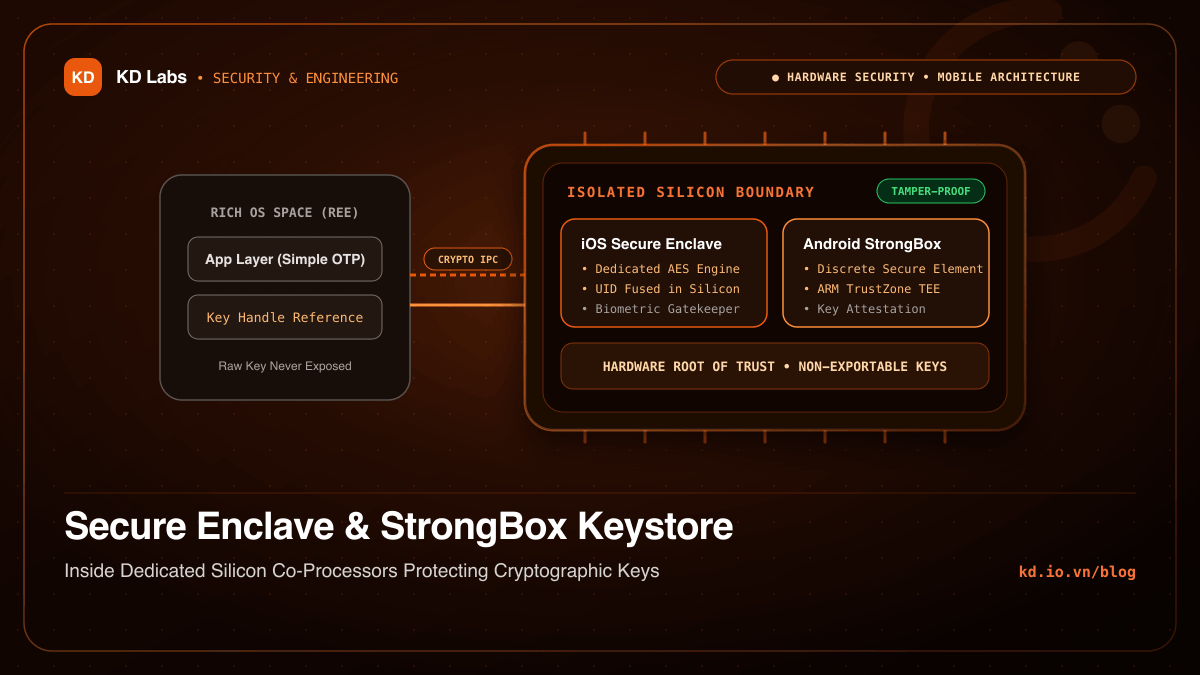
To prevent the main operating system from ever touching raw cryptographic keys, modern smartphone System-on-Chips (SoCs) partition execution across strict hardware boundaries:
┌─────────────────────────────────────────────────────────────────────┐
│                 RICH EXECUTION ENVIRONMENT (REE)                    │
│   [ App Layer: Simple OTP ]  ───►  Holds Only a "Key Handle" Alias  │
└───────────────────┬─────────────────────────────────────────────────┘
                    │ Cryptographic IPC Call (Send Ciphertext Payload)
                    ▼
════════════════════╪══════════ PHYSICAL SILICON BOUNDARY ═════════════
                    ▼
┌─────────────────────────────────────────────────────────────────────┐
│          ISOLATED SECURITY PROCESSOR (Secure Enclave / StrongBox)   │
│                                                                     │
│  • Dedicated CPU Core, Crypto Engine & Hardware TRNG                │
│  • Laser-Fused 256-bit Silicon UID (Unreadable by OS or Vendor)     │
│  • Executes AES / ECDSA Internally & Returns Only the Result        │
└─────────────────────────────────────────────────────────────────────┘
2.1. Apple’s Secure Enclave Processor (SEP)
Introduced with the Apple A7 chip and refined across every generation of Apple Silicon, the Secure Enclave is a dedicated hardware co-processor fabricated inside the SoC:
- Isolated Microkernel OS: The SEP does not run iOS; it runs a hardened, proprietary L4-based microkernel (sepOS) with its own hardware boot ROM.
- Silicon-Fused Unique ID (UID): During semiconductor manufacturing, each Secure Enclave generates a unique 256-bit UID via its internal True Random Number Generator (TRNG) and fuses it permanently into silicon. No software—not iOS, not kernel drivers, and not even Apple—can ever read this raw UID.
- Encrypted Memory Subsystem: When the Secure Enclave utilizes a dedicated region of system DRAM, a hardware inline AES engine encrypts every memory page using an ephemeral boot key paired with an anti-replay counter tree.
2.2. Android Keystore: From ARM TrustZone (TEE) to StrongBox
Android provides two tiers of hardware-backed key isolation through the Android Keystore System:
- TEE (Trusted Execution Environment – ARM TrustZone): Partitions the main SoC at the hardware bus level into a Normal World (running Android OS) and a Secure World (running an isolated security OS such as Qualcomm QSEE or Trustonic Kinibi).
- StrongBox Keymaster / KeyMint (Android 9+): Analogous to Apple’s Secure Enclave and discrete smartcards, StrongBox runs inside a completely separate physical security chip (such as the Google Titan M2 on Pixel devices or Samsung Knox Vault). StrongBox features its own CPU, dedicated non-volatile flash storage, true random number generator, and physical sensors designed to detect voltage glitching, laser fault injection, and side-channel power analysis.
3. The Golden Rule: Non-Exportable Hardware Keys
The defining security property of a hardware enclave is simple: Raw private and symmetric keys never cross the silicon boundary.
When a security-critical app like Simple OTP requests a new 256-bit Master Key from the Android Keystore or iOS Keychain:
- The hardware processor generates the random key bytes internally using its hardware TRNG.
- The main operating system and application receive only an opaque Key Alias / Reference Handle.
- When the app needs to decrypt your local 2FA vault, it passes the encrypted payload (
Ciphertext) alongside the key handle over an Inter-Process Communication (IPC) channel into the hardware enclave. - The security processor verifies hardware access policies (for example, confirming that the biometric sensor just authenticated the user’s face or fingerprint), performs the AES-GCM operation inside silicon, and returns the resulting plaintext.
Even if an attacker achieves complete root control over the host OS kernel, they cannot extract the raw key material to decrypt your data on an external machine.
4. Envelope Encryption & Biometric Binding in Practice
Because hardware security modules have constrained internal storage and narrow IPC buses, production cryptographic systems implement Two-Tier Envelope Encryption:
- Tier 1 – KEK (Key Encryption Key / Hardware Master Key): Generated and permanently locked inside the Secure Enclave / Android Keystore. Non-exportable.
- Tier 2 – DEK (Data Encryption Key / Master Vault Key): A high-throughput 256-bit AES-GCM key used to encrypt the local database of 2FA secrets. At rest on disk, the
DEKis wrapped (encrypted) by the hardwareKEK.
Here is how a hardware-backed master key is provisioned on Android (Kotlin) with explicit StrongBox preference:
import android.security.keystore.KeyGenParameterSpec
import android.security.keystore.KeyProperties
import java.security.KeyStore
import javax.crypto.KeyGenerator
import javax.crypto.SecretKey

fun getOrCreateHardwareMasterKey(keyAlias: String, hasStrongBox: Boolean): SecretKey {
    val keyStore = KeyStore.getInstance("AndroidKeyStore").apply { load(null) }

    // Return existing opaque key reference if already provisioned in hardware
    keyStore.getEntry(keyAlias, null)?.let { entry ->
        return (entry as KeyStore.SecretKeyEntry).secretKey
    }

    val keyGenerator = KeyGenerator.getInstance(
        KeyProperties.KEY_ALGORITHM_AES,
        "AndroidKeyStore"
    )

    val specBuilder = KeyGenParameterSpec.Builder(
        keyAlias,
        KeyProperties.PURPOSE_ENCRYPT or KeyProperties.PURPOSE_DECRYPT
    )
        .setBlockModes(KeyProperties.BLOCK_MODE_GCM)
        .setEncryptionPaddings(KeyProperties.ENCRYPTION_PADDING_NONE)
        .setKeySize(256)
        .setRandomizedEncryptionRequired(true) // Enforce hardware-guaranteed unique IVs
        .setIsStrongBoxBacked(hasStrongBox)    // Route to discrete StrongBox chip when available

    keyGenerator.init(specBuilder.build())
    return keyGenerator.generateKey()
}
And on iOS (Swift), binding a keychain item strictly to the current physical device (kSecAttrAccessibleWhenUnlockedThisDeviceOnly) and invalidating the key automatically if biometric enrollments are modified:
import Security
import Foundation

func createHardwareProtectedAccessControl() throws -> SecAccessControl {
    var error: Unmanaged<CFError>?
    guard let accessControl = SecAccessControlCreateWithFlags(
        kCFAllocatorDefault,
        // Strictly bound to this physical device's UID; excluded from iCloud/iTunes backups
        kSecAttrAccessibleWhenUnlockedThisDeviceOnly,
        [.privateKeyUsage, .biometryCurrentSet],
        &error
    ) else {
        throw error!.takeRetainedValue() as Error
    }
    return accessControl
}
Notice the .biometryCurrentSet flag: if an attacker shouldersurfs your device passcode and registers their own fingerprint or Face ID appearance in iOS Settings, the Secure Enclave immediately invalidates the cryptographic key, blocking unauthorized vault decryption.
5. Comparing Mobile Key Storage Architectures
| Security Property | Software Storage (Files/SQLite) | Android TEE (ARM TrustZone) | Apple Secure Enclave & Android StrongBox |
|---|---|---|---|
| Root Key Location | App Flash Directory | Isolated SoC Secure World | Discrete Co-Processor / Security IC |
| Root / Jailbreak Key Extraction | ❌ Vulnerable (Direct file copy) | ✅ High (Keys never enter REE) | ✅ Maximum (Physical silicon isolation) |
| Brute-Force Rate Limiting | ❌ Software-only (Bypassable) | ✅ Enforced by TEE firmware | ✅ Hardware-enforced exponential backoff |
| Biometric Gatekeeping | ⚠️ UI-level boolean check | ✅ Cryptographic TEE gate | ✅ Direct hardware sensor attestation |
| Device-Clone Resistance | ❌ Trivially cloned via disk image | ✅ Bound to SoC hardware key | ✅ Fused to immutable silicon UID |
6. How KD Labs Engineers Hardware Enclaves into Simple OTP
When architecting Simple OTP, we started from a zero-compromise baseline: Never trust standard application storage with raw cryptographic secrets.
- On iOS, your Master Vault Key (MVK) is anchored inside the iOS Keychain with
ThisDeviceOnlyhardware protection and optional Face ID / Touch ID cryptographic gating. - On Android, the vault leverages the Android Keystore to wrap and unwrap the AES-256-GCM encryption keys inside hardware-backed storage.
- Paired with a 100% offline Zero-Network architecture, even if your phone is lost or physically inspected, your 2FA secrets remain sealed behind dedicated silicon security processors.
Conclusion
Understanding the distinction between software-level encryption and hardware-backed cryptography empowers you to evaluate security tools critically. True mobile security doesn’t just rely on strong mathematical ciphers—it anchors those ciphers deep inside the silicon vaults built into your device.